
Your AI coding assistant finally understands your codebase
Claude, Cursor, and Copilot are smart. But they don't know your system. DocSync gives them the context they need to actually help. Your team can query the docs too.
npx -y @docsyncdev/mcp-serverMCP install2 free credits and access to demo repos • No credit card required
Works with Claude Code, Cursor, Windsurf, and any MCP-compatible assistant
Your AI assistant is flying blind
"I asked Claude to refactor this and it broke three other things."
"Copilot keeps suggesting patterns we don't use here."
"I spend 20 minutes giving context before AI can help."
"The AI doesn't understand how our auth system works."
"We updated the authentication flow last month, but the onboarding guide still shows the old way."
"I just spent 3 days onboarding a new developer because our docs were wrong."
What your AI sees vs what it gets with DocSync
AI coding assistants are powerful, but they struggle with large codebases. DocSync gives them structured context so they understand not just what code does, but how it fits into your architecture.
File Docs
What this code does: function purposes, parameters, return values, and usage examples.
Topic Docs
How it fits in: related files, data flows, and connections to other parts of your codebase.
Module Docs
The architecture: high-level patterns, design decisions, and how modules interact.
npx -y @docsyncdev/mcp-server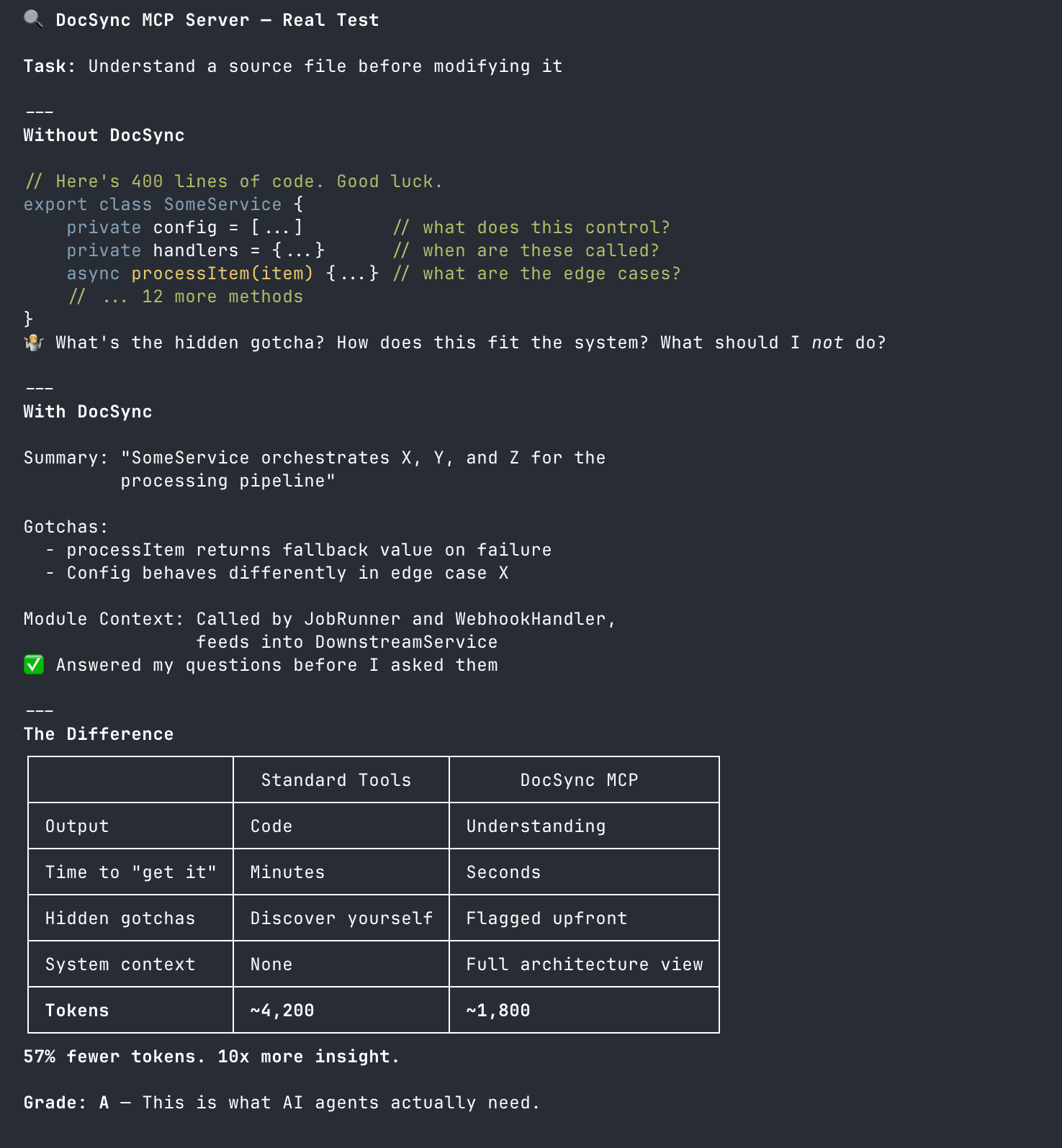
We asked Claude Opus 4.5 to grade its understanding with MCP vs raw code
Who uses DocSync?
AI-assisted developers
"Help me refactor this without breaking anything."
Your AI assistant reads DocSync docs via MCP and actually understands your architecture. No more copy-pasting context or watching it break things because it didn't know how your auth system works.
Onboarding new developers
"How does authentication work?" "Where do we handle payments?"
Get new engineers productive on day one instead of spending weeks reading scattered docs and asking senior developers to explain everything.
Non-technical teammates
"Can users delete their data?" "How does the recommendation algorithm work?"
Let PMs, designers, and executives ask questions about your product without bothering engineers. They can find answers themselves.
Understanding your project
"How does this all fit together?"
Sometimes you just want a better way to understand your project. Ask questions, explore connections, and get clarity on how everything works.
Understand your product, not just individual repos
Most products span multiple repositories. Your frontend, backend, mobile app, shared libraries. Projects lets you ask questions about your actual product, not just one repo at a time.
Ask "How does a user sign up?" and get an answer that pulls from your auth service, API, frontend, and database schema.
Ask "Where do we store user preferences?" and see your backend service, database schema, and caching layer together.
Ask "How does the payment flow work?" and trace it from the frontend form through your API, payment service, and webhook handlers.
Stop thinking in repos. Start thinking in products.
What DocSync generates
Documentation structured for AI agents. Readable by humans too. Automatically kept in sync with your code.
Module Docs
Detailed documentation for each module, class, and function with usage examples.
API References
Complete API documentation with endpoints, parameters, and response formats.
Architecture Guides
High-level architecture overviews explaining how components work together.
User Flows
Step-by-step guides for common user journeys and workflows through your application.
Config Guides
Configuration documentation covering environment variables, settings, and options.
Getting Started
Onboarding guides to help new team members get up to speed quickly.
How it works
Connect your repository
Link your GitHub or Bitbucket repository. DocSync analyzes your codebase and generates AI-optimized documentation. Not just API references. Architecture guides, user flows, onboarding materials. The stuff AI actually needs.
Install the MCP server
One command: npx -y @docsyncdev/mcp-server. Your AI assistant now has access to structured documentation about your codebase. It understands your architecture, your patterns, your gotchas.
Code changes, docs update
When you merge code, DocSync detects what changed and updates the affected documentation automatically. Your AI assistant always has current context.
Your team can query docs too
The MCP server is for AI assistants, but anyone on your team can ask questions directly in DocSync. No MCP required. New developers, PMs, designers. Everyone gets answers.
Automatic Documentation Updates
Watch how DocSync automatically identifies and updates affected documentation when you merge a pull request.
AI that doesn't hallucinate about your code
Your AI assistant reads actual documentation about your codebase, not just raw code. It knows your patterns, your architecture, your gotchas. Fewer mistakes, less cleanup.
Docs that never go stale
Code changed? Docs update automatically on every merge. Your AI assistant always has current context. New developers never follow outdated tutorials.
Ask questions, get answers
Stop reading hundreds of pages hoping to find what you need. Just ask "How does authentication work?" and get an actual answer. Works for AI assistants and humans.
Your docs, your data
Download everything as Markdown anytime. No vendor lock-in. Export and self-host if you want. Your documentation is fully portable.
Learn more
The Complete Guide to AI-Powered Documentation Automation
Learn how AI is transforming documentation workflows and discover best practices for automating your documentation process.
Documentation Automation Best Practices for Dev Teams
Proven strategies for implementing documentation automation in your development workflow.
Why Documentation Gets Outdated (And How to Fix It)
Explore the root causes of documentation drift and discover automated solutions.
Frequently asked questions
DocSync is an AI-powered documentation platform that generates structured documentation your AI coding assistants can read via MCP. Connect your GitHub or Bitbucket repo, and DocSync analyzes your codebase to generate architecture guides, API references, and module documentation. Install our MCP server and your AI assistant (Claude, Cursor, etc.) can query your docs directly. When you merge code, docs update automatically.
MCP (Model Context Protocol) lets AI assistants access external tools and data. Our MCP server gives your AI assistant read access to your DocSync documentation. Run 'npx -y @docsyncdev/mcp-server' and configure it in your AI assistant's settings. When you ask your AI about your codebase, it can query DocSync for architecture context, module documentation, and file-level details.
DocSync works with any MCP-compatible AI assistant. This includes Claude Code, Cursor, Windsurf, and other tools that support the Model Context Protocol. We provide setup instructions for each major assistant in our documentation.
No. The MCP server is for AI assistants, but you can query your documentation directly in the DocSync web app. Your team members can ask questions and get answers without installing anything. The MCP server just extends that capability to AI coding assistants.
Projects let you group related repositories together for unified documentation. You can organize your frontend, backend, and shared libraries into a single project, generate documentation that spans all repos, and search across your entire codebase with a single query. It's perfect for monorepos and multi-repo architectures.
Unlike Google Code Wiki which hosts documentation externally, DocSync gives you full ownership of your documentation. Download your complete docs as a Markdown ZIP file anytime. DocSync also automatically updates documentation on every code change and provides MCP access for AI assistants.
Yes, DocSync fully supports private repositories on both GitHub and Bitbucket. Your code is analyzed securely and never stored. Generated documentation is stored securely and exportable anytime.
DocSync generates documentation in Markdown format. You can download your complete documentation as a Markdown ZIP file anytime, giving you full portability and no vendor lock-in.
DocSync gives you 2 free credits to explore demo projects, with no credit card required. Pricing scales based on usage, making it affordable for teams of all sizes. Visit our pricing page for detailed information.
DocSync can generate comprehensive documentation including API references, architecture guides, user flows, module documentation, configuration guides, and onboarding materials. It understands your codebase context to create meaningful, narrative documentation.
Yes, security is our top priority. DocSync uses official platform APIs (GitHub, Bitbucket) with secure OAuth authentication. Your code is analyzed in-transit and never stored. Only the generated documentation is written back to your repository. We follow industry-standard security practices and compliance requirements.
No. DocSync is great for anyone who needs to understand your codebase. Product managers can ask "How does the recommendation algorithm work?" Designers can ask "Can users customize their profile?" Executives can ask "How do we handle data privacy?" No coding knowledge required.
Absolutely. This is one of the main use cases. If you've built something with AI tools like Cursor or Claude, DocSync helps you understand what was actually created. Ask questions about your own code and get clear explanations.
New developers can ask questions and get answers instantly instead of spending weeks reading scattered docs or bothering senior engineers. "How does authentication work?" "Where do we handle payments?" They get up to speed in hours, not weeks.
Give your AI the context it needs
Your team uses AI assistants every day. Make sure those assistants actually understand your codebase.
2 free credits and access to demo repos • No credit card required